

own.audio extras
An own.audio server is a library for a whole family: music, audiobooks and podcasts, each person listening from their own position. It can be one you run yourself or own.audio’s hosted service. With an own.audio server added, its page in Settings has three more screens: Family, Devices and Listening.
Family
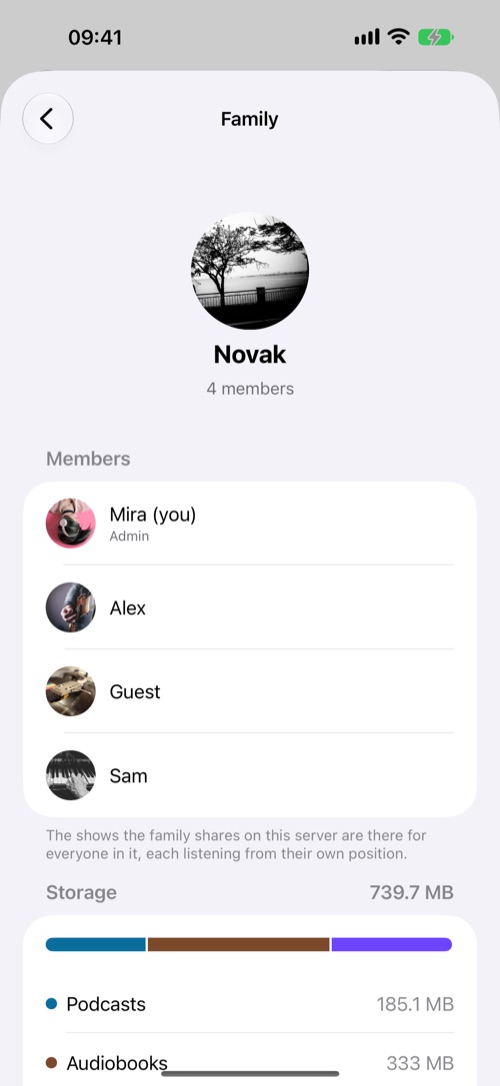
- The family’s picture and name, and how many members it has.
- Members: everyone in the family, with (you), Admin or Invited beside the name. The shows the family shares on the server are there for everyone in it.
- Storage: what the family keeps on the server, split into Podcasts, Audiobooks and Music, shown where the server reports it.
- Credit, where the server is paid from prepaid credit (the hosted service): Balance, A Month at Today’s Storage and Lasts About. The balance turns red when the credit has run out.
Inviting someone (admins)
- Tap Invite Someone. A code is made, and the Invitation screen shows it with a QR code.
- Hand it on with Share Invitation, let them scan the QR code, or read out the code. One invitation is for one person.
Open invitations are listed under Invitations with the date they expire. Tap one to show it again, or swipe it to the left (or touch and hold it, or right-click it on a Mac) for Withdraw.
Joining another family
Join Another Family… asks for the code from that family’s admin. After you confirm, you leave your current family, and what the other family shares appears instead.
Devices
Every device signed in to your account, this one marked This device, with when each was last used. Swipe a device to the left, or touch and hold it (right-click on a Mac), for Sign Out. Sign Out Everywhere ends every session, this device’s too, so you will need to sign in again.
Listening
How long you have listened, from every own.audio app signed in to the account. Choose Week, Month, Year or All.
- Listened and Days in a Row, and how many audiobooks you finished.
- A chart of minutes per day.
- By Kind: music, audiobooks and podcasts.
- Most Played.
- Share with the Family’s Admin: lets the admin see how long you listen and to what kind. Off, your listening stays yours.
- If you are the family’s admin, Family lists each member’s total, or Not Shared for those who don’t share it.
Episode summaries and questions
An own.audio server can offer summaries of episodes that have a transcript. Where it doesn’t, or the episode has no transcript, none of this appears.
Where it does, the episode’s page has a Summary section:
- Pick Short, Medium or Long, then Summarize Episode. The summary is made from the transcript with AI and paid from the family’s credit, usually a cent or two; the cost is shown under it. Once made, everyone in the family can read it.
- Type in Ask about this episode and tap Ask. Answers come from the episode’s transcript only, each one is paid from the family’s credit, and your questions are kept for you alone. Clear Questions deletes your questions and answers for that episode.
Summaries are written in the app’s language. If the family’s credit is too low, or the day’s limit for paid work is reached, the app says so.
Discover from your server
An own.audio server with a podcast catalog takes over Discover: its categories, its search, More Like Your Shows and Similar Shows. Nothing you search for then leaves your server.
Deleting your account
On the server’s page, Delete Account… deletes your account on that server for good, with everything you added to it: music, audiobooks, podcasts, playlists and your listening history. What others in your family added stays with them. The server’s only admin can’t delete their account this way, and the shared demo account can’t be deleted.