

Playlists and smart playlists
Playlists
The Playlists tab lists the server’s playlists, with their number of songs. A playlist someone else made says whose it is (“by …”).
- + at the top right makes a new, empty playlist: New Playlist, give it a name, Create.
- To add songs, use Add to Playlist… in a song’s menu, or Add Album to Playlist… in an album’s menu. The sheet lists your own playlists and New Playlist…, which makes one with those songs in it.
A playlist
A playlist shows its cover, name and description, Play and Shuffle, and its songs. At the top right:
- Download (the arrow): keeps the playlist on the phone. See Downloads.
- On your own playlists, the ⋯ menu (Edit Playlist):
- Rename
- Choose Cover… (own.audio)
- Share with the Family or Stop Sharing (own.audio with a family)
- Delete Playlist. This deletes it on the server, for every app that uses it.
In your own playlists, swipe a song or use Remove from Playlist in its menu to take it out. A playlist can hold the same song twice.
Playlists live on the server, so every app signed in to the same account sees the same ones.
Smart playlists (own.audio)
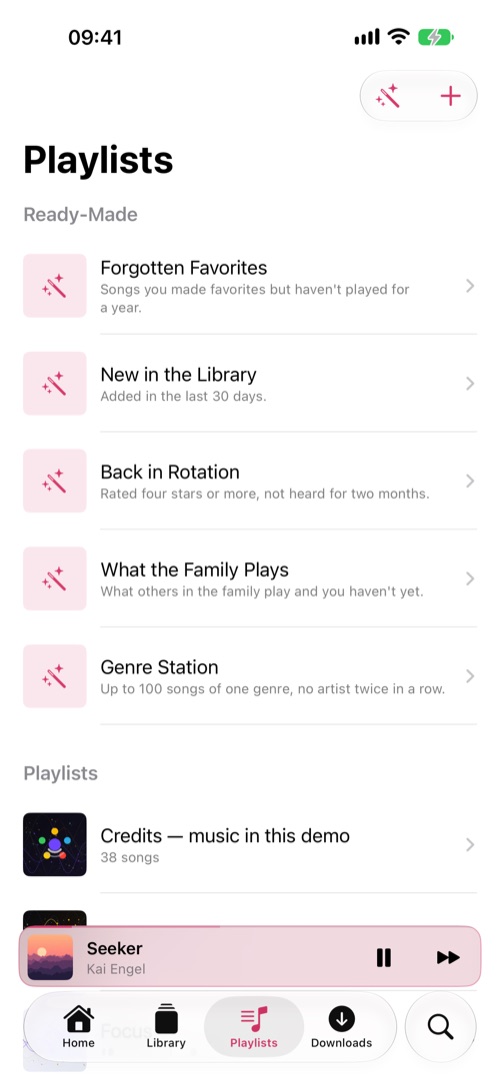
On an own.audio server, the Playlists tab also has smart playlists. A smart playlist is a rule rather than a list: each time you open it, the server chooses songs that fit, from your own listening.
Ready-Made are the server’s own rules:
| Name | What it picks |
|---|---|
| Forgotten Favorites | Songs you made favorites but haven’t played for a year. |
| New in the Library | Added in the last 30 days. |
| Back in Rotation | Rated four stars or more, not heard for two months. |
| What the Family Plays | What others in the family play and you haven’t yet. |
| Genre Station | Up to 100 songs of one genre, no artist twice in a row. Choose the genre first. |
Smart Playlists are the ones you saved.
A smart playlist
It shows the songs chosen this time and a line such as “25 songs, chosen from 340 that fit”. Tap a song to play from it. At the top right:
- New Selection (the circular arrow) asks for a new choice.
- Smart Playlist Actions (⋯):
- Edit Rule (your own);
- Save as Playlist: keeps this choice as an ordinary playlist. It won’t change from then on;
- Delete Smart Playlist (your own). Playlists made from it stay;
- on a ready-made one, Save as Smart Playlist: a copy of its rule you can change.
If nothing in the library fits the rule at the moment, it says Nothing Fits Right Now.
Making or editing a rule
The magic-wand button at the top of the Playlists tab opens New Smart Playlist. While you change the rule, the editor shows how many songs fit.
| Setting | Choices |
|---|---|
| Name | |
| Share with the Family | Shared, it is a rule rather than a list: each member gets their own selection, from what they have listened to. |
| Genres | All, or the genres you pick. |
| Favorites Only | On or off. |
| Rating at Least | Any, or one to five stars. |
| Not Played For | Any Time, A Month, Three Months, Half a Year, A Year. |
| Added in the Last | Any Time, Week, Month, Three Months. |
| Played by Others, Not by Me | On or off. |
| Limit the Tempo | From and To, in BPM, 40 to 240. |
| Energy | Any, Calm, Moderate, Energetic. |
| Length | A number of Songs (10 to 500) or Minutes (15 to 1440). |
| Order | Mixed, Favorites More Often, Best First, Longest Unplayed First, Random. |
| Energy Over Time | Even, Warm Up, Steady, Cool Down, Building Up, Winding Down. |
| At Most … per Artist | 1 to 20. |
| Never the Same Artist Twice in a Row | On or off. |
Only songs the server has analysed have a tempo and an energy; with Limit the Tempo or Energy set, the others are left out.
Tap Save.