

Family and your own.audio account
On own.audio, a library belongs to a family: several people on one server, each with their own account. The pages here are on the server’s page in Settings (Settings → your server), and only for own.audio servers the app talks to through own.audio’s own API.
Family
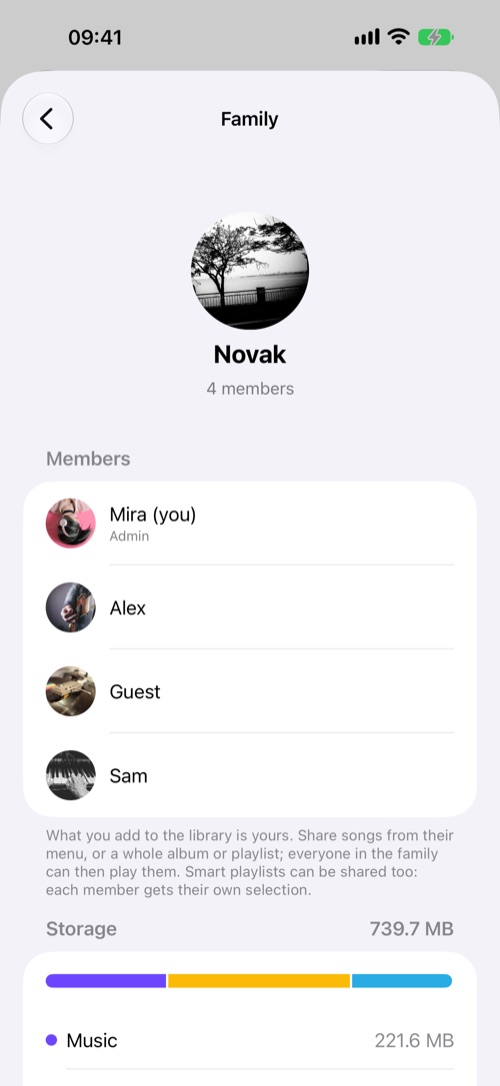
Family (shown for the server in use) has:
- the family’s picture, name and number of members;
- Members: everyone in the family, with Admin next to the family’s admin and Invited for someone who hasn’t joined yet;
- Storage: how much the family keeps, split into Music, Audiobooks and Podcasts;
- Credit, where the server is paid for: the Balance, A Month at Today’s Storage and how long the credit Lasts About. Storage is paid from the family’s prepaid credit, day by day. Topping it up is not done in the app.
Inviting someone
The family’s admin sees Invitations. Invite Someone makes an invitation: a code for one person, shown with a QR code of its link and Share Invitation. They sign in to the same server and enter the code, or open its link. Tap an invitation to show it again; Withdraw, in its menu or by swiping it, cancels it.
Joining another family
Join Another Family… asks for the code from that family’s admin. Joining means leaving this family: what the other family’s members share appears instead of what this one shares.
Sharing
What you add to the library is yours. Nothing is shared until you share it, and “not shared” only means the others don’t see it; nothing is locked.
- A song: Share with the Family or Stop Sharing in its menu.
- An album: Share My Songs with the Family or Stop Sharing My Songs in its More menu. This covers your own songs on it.
- A playlist of yours: Share with the Family or Stop Sharing in its menu.
- A smart playlist: Share with the Family in its rule. Each member then gets their own selection, from what they have listened to.
Songs shared with the family have a small people icon in song lists.
Covers and pictures
On own.audio you can give your own songs, albums and playlists, and artists, a picture from your photos: Choose Cover…, Choose Album Cover… or Choose Picture… in their menus. The app uses the system photo picker, which doesn’t need access to your whole photo library, and sends the picture to the server at most 1600 pixels on its longest side.
Devices
Devices lists every device signed in to your account, with This device marked, and when each was last used. Swipe a device, or open its menu, to Sign Out of it. Sign Out Everywhere ends every session, this device’s too, and asks for a fresh sign-in.
Listening
Listening shows how much you listened, from every own.audio app signed in to the account, for a Week, Month, Year or All:
- Listened and Days in a Row (and Audiobooks Finished, if any);
- minutes per day as a chart;
- By Kind: Music, Audiobooks, Podcasts;
- Most Played.
Share with the Family’s Admin lets the admin see how long you listen, and to what kind. Off, your listening stays yours. The admin sees a Family section with the time of those who share it, and Not Shared for the others.