

Library and search
The Library tab
Library shows every book on the selected server, as a grid of covers or as a list.
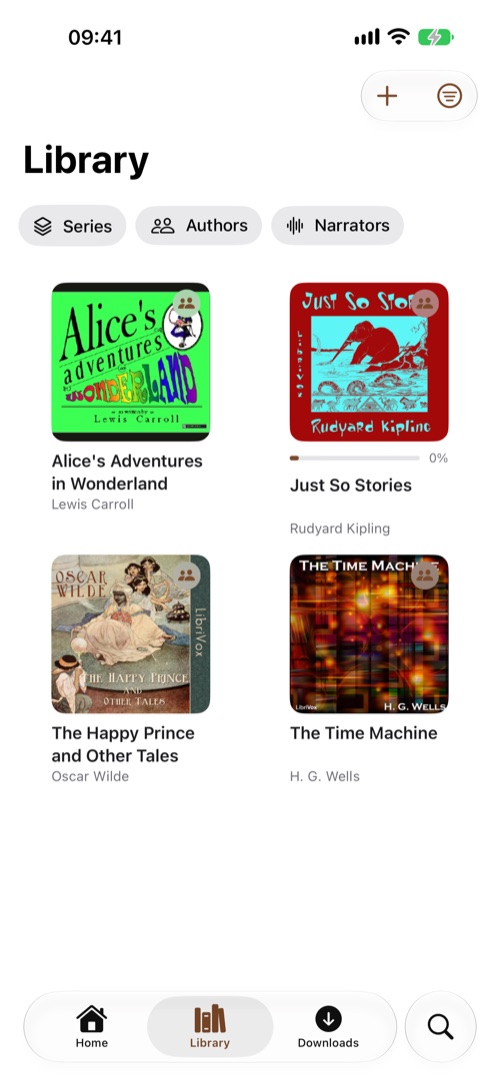
Above the books are chips to the other ways into the library. Only those the server has appear:
| Chip | own.audio | Audiobookshelf |
|---|---|---|
| Series | Yes | Yes |
| Authors | Yes | Yes |
| Narrators | Yes | Yes |
| Collections | No | Yes |
The list scrolls on as far as the library goes; more books load as you reach the end. Pull down to reload.
Sort and filter
The round button with lines at the top right opens a menu:
- Sort: Title, Author, Recently Added or Length, and Descending to reverse the order.
- Show: All, Not Started, In Progress, Finished, and on own.audio Favorites.
- Grid: on for covers, off for a list. In the list, each row shows the cover, title, author, and the length with the time left (“4 h 12 min · 1 h 3 min left”) or Finished. The book that is playing has a small moving indicator.
The + button (own.audio)
On an own.audio server, a + button at the top lets you add a book from your iPhone. See Adding books. It is hidden on Audiobookshelf and while the app is offline.
Series
Series lists the server’s series with the number of books in each. A series opens its books in reading order, each with its number in the series.
Authors and narrators
Authors and Narrators list people with the number of their books. Type in the Filter field at the top to find someone in a long list. A person opens their books, with the same sort and filter menu as the library.
Collections (Audiobookshelf)
Collections lists the collections made on your Audiobookshelf server, with the number of books in each. A collection opens its books.
Downloading a whole set
A series, an author’s or narrator’s books, and a collection have a download arrow at the top right. It downloads every book in the set, including those you haven’t scrolled to. While they come, the arrow becomes a ring with the count downloaded so far; when all are on the iPhone, it turns into a filled arrow with Remove These Downloads in its menu. See Downloads and offline.
Search
The Search tab searches titles, authors, narrators and series. Type at least two letters; the results come in sections: Books, Series, Authors and Narrators. A tap opens the book, series or person.
On Audiobookshelf the server does the searching. On own.audio the app searches its copy of the library on the iPhone. While offline, search finds downloaded books by title and author.