

Family (own.audio)
An own.audio account belongs to a family. Each member has their own books and positions, and chooses which of their books to share with the others. Audiobookshelf has no families, so none of this appears for an Audiobookshelf server.
Sharing a book
What you add to the library is yours. To share one of your books, open its page, tap ⋯ and choose Share with the Family. Everyone in the family can then listen to it, each from their own position. Keep to Myself takes it back. You can only share books you added yourself.
Shared books have a people badge on their covers, and Shared with the family on their page. When you import a book you can share it straight away (Who sees it: The family).
The Family screen
Open Settings, tap your own.audio server, then Family. (It appears for the selected server.)
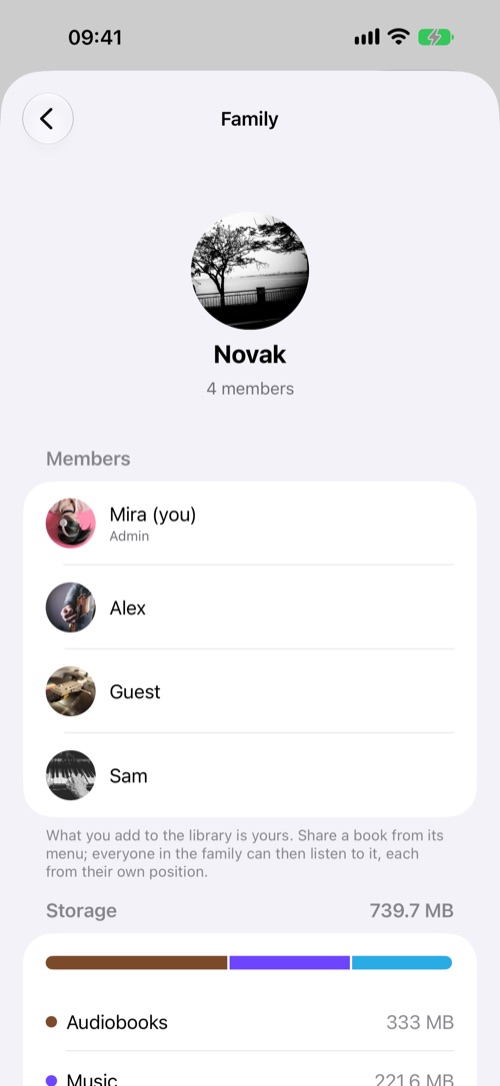
- Members: everyone in the family, with Admin for the family’s admin and Invited for someone who hasn’t joined yet.
- Storage: how much the family’s library takes, split into Audiobooks, Music and Podcasts (own.audio also has music and podcast apps).
- Credit: on a server that charges for storage, the family’s Balance, A Month at Today’s Storage and how long the credit Lasts About. Storage is paid from the family’s prepaid credit, day by day; top-ups are not made in the app.
- Invitations (the admin only): Invite Someone makes a code for one person, shown with a QR code and a Share Invitation button. They sign in to the same server and enter the code, or open its link. Swipe an invitation to Withdraw it, or touch and hold it (right-click on a Mac).
- Join Another Family…: enter a code from another family’s admin. You then leave this family, and what the other family shares appears instead.
Devices
On the server’s page in Settings, Devices lists every device signed in to your account, with This device marked and when each was last used. Swipe a device to Sign Out, or touch and hold it (right-click on a Mac). Sign Out Everywhere ends every session, this device’s too, and you sign in again.
Listening
Listening, on the same page, shows what you have listened to in all own.audio apps signed in to the account: choose Week, Month, Year or All.
- Listened (total time), Days in a Row and Audiobooks Finished
- a chart of minutes per day
- By Kind: audiobooks, music, podcasts
- Most Played
Share with the Family’s Admin lets the admin see how long you listen, and to what kind; off, your listening stays yours. The admin sees a Family section with the time of those who share it, and Not Shared for the others.