

A book’s page
Tap a book anywhere in the app to open its page.
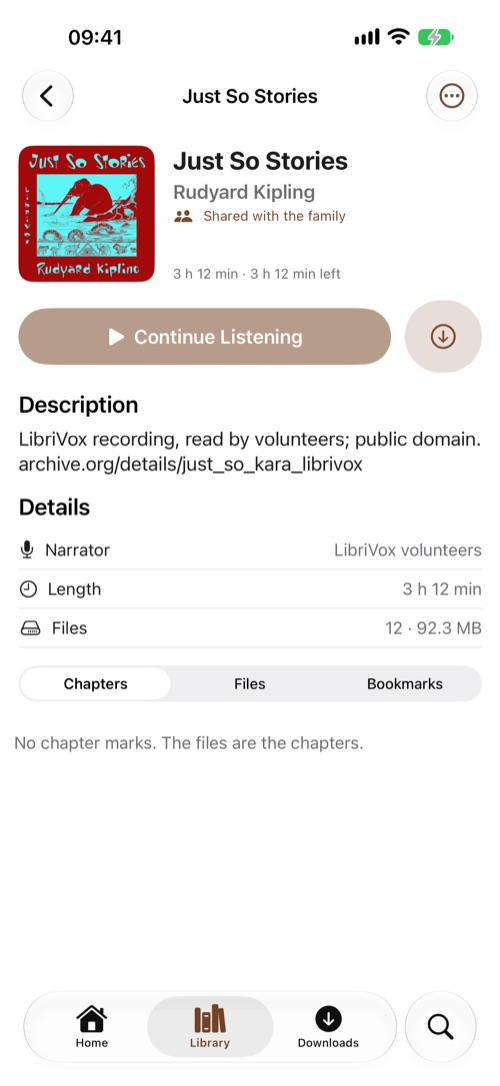
At the top
The cover, title, subtitle and author. Below them:
- the series the book belongs to, with its number (“The Expanse #3”); tap it to open the series,
- Shared with the family for a book shared in your own.audio family,
- the length, with the time left once you have started (“3 h 12 min · 3 h 12 min left”), or Finished.
Play and download
The wide button plays the book. Its label says what it will do: Play, Continue Listening, Listen Again for a finished book, or Pause / Resume for the book that is playing. The button’s fill is also a progress bar: the darker part is how far you are.
The round button beside it downloads the book:
| Looks like | Means | A tap |
|---|---|---|
| Arrow | Not on this iPhone | Starts the download |
| Ring filling up | Downloading | — |
| Check mark | Downloaded | Asks Remove Download? |
| Arrow in a circle with an exclamation mark | The download failed | Tries again |
Description and details
Description shows the server’s description of the book (the first lines of it). Details lists what the server knows: Narrator, Length, Published, Publisher, Genres and Files (how many, and their size).
Chapters, Files, Bookmarks
The switch at the bottom shows one of three lists. A tap on any row plays the book from there.
- Chapters: each chapter with its length; the one playing is marked. If the server has no chapters for the book, the app reads the chapter marks from the audio files themselves when you play it. A book with no marks at all says “No chapter marks. The files are the chapters.”
- Files: the book’s audio files in order, with their lengths.
- Bookmarks: the bookmarks you made in the player. Touch and hold one to Delete it.
The book’s menu
The ⋯ button at the top right has:
| Item | What it does | Where |
|---|---|---|
| Add to Favorites / Remove Favorite | Marks the book with a heart. Favorites can be shown with the library’s Show filter. | own.audio |
| Share with the Family / Keep to Myself | Shares a book you added with everyone in your family, or takes it back. Shown only for your own books. | own.audio |
| Mark as Finished / Mark as Not Finished | Sets the book finished or not, on the server too. | Both |
| Reset Progress | After asking, forgets your position in the book on every device. | Both, once you have started the book |